For Event Venue Websites
Give Venue Prospects a Better Next Step
Live Venue Quote helps event venues move beyond the generic inquiry form. Let prospects check availability and either build an immediate priced quote or complete a guided inquiry for formal quoting.
Works with any event venue website. BrandWave subscription not required.
What It Is
Live Venue Quote is a client-facing availability, quote, and inquiry tool for event venue websites. It helps prospects check availability and move through either an Instant Quote or Guided Inquiry experience, while giving the venue structured event information for follow-up.
Two Modes
Choose the inquiry experience that fits your venue
Instant Quote
For venues ready to show configured pricing.
Prospects can check availability, select a package, build their event with available options, and receive an immediate priced quote.
- 1. Check availability
- 2. Build a package
- 3. Receive an immediate priced quote
Guided Inquiry
For venues that prefer to prepare the formal quote themselves.
Prospects can check availability, provide event details, explore relevant add-ons and options, and submit a structured inquiry for formal quoting.
- 1. Check availability
- 2. Share event details
- 3. Explore add-ons
- 4. Submit for formal quoting
How It Works
Shared start. Two paths, based on your mode.
Every visitor starts the same way. The path then branches based on whether the venue is configured for Instant Quote or Guided Inquiry.
Prospect visits the venue website
A visitor arrives from search, social, a directory, or a referral and opens the Live Venue Quote experience embedded on the site.
Prospect checks availability
The tool checks the requested date against the venue's connected calendar. Availability information is shown, without automatically reserving the date.
Instant Quote Path
Select package and options
The prospect chooses a package and builds their event with the available options configured for the venue.
See the configured price
The tool calculates the price in real time using the venue's configured rates and package logic.
Receive the quote and submit for next steps
The prospect receives a branded PDF of the priced quote and submits their information so the venue can follow up.
Guided Inquiry Path
Provide event details
The prospect shares event date, guest count, event type, and other relevant details.
Review relevant add-ons or options
The prospect explores add-ons and options that fit their event, giving the venue useful context.
Submit the inquiry for formal quoting
The structured inquiry is submitted to the venue, which prepares and sends the formal quote.
In both modes, the venue receives structured information and follows up based on its own sales process.
Both Sides Benefit
What the prospect gets. What the venue gets.
The prospect gets
- • A clear next step after visiting the website
- • Availability information
- • Package or option exploration
- • An immediate priced quote, or a structured path to formal quoting
- • Useful answers before the sales conversation begins
The venue gets
- • Event date and event details
- • Package or option interest
- • Add-on interest
- • More context before follow-up begins
- • A structured inquiry instead of a generic pricing request
Availability vs. Holds
Availability first. Holds when your process calls for them.
Live Venue Quote can check availability without automatically reserving the date. For BrandWave-connected venues, the workflow can optionally be configured to place a hold when that fits the venue's sales process.
Calendar Compatibility
Works with the calendars venues already use.
Live Venue Quote supports availability workflows with Google Calendar and Outlook Calendar.
See It Live
Already Running at InDo Nashville
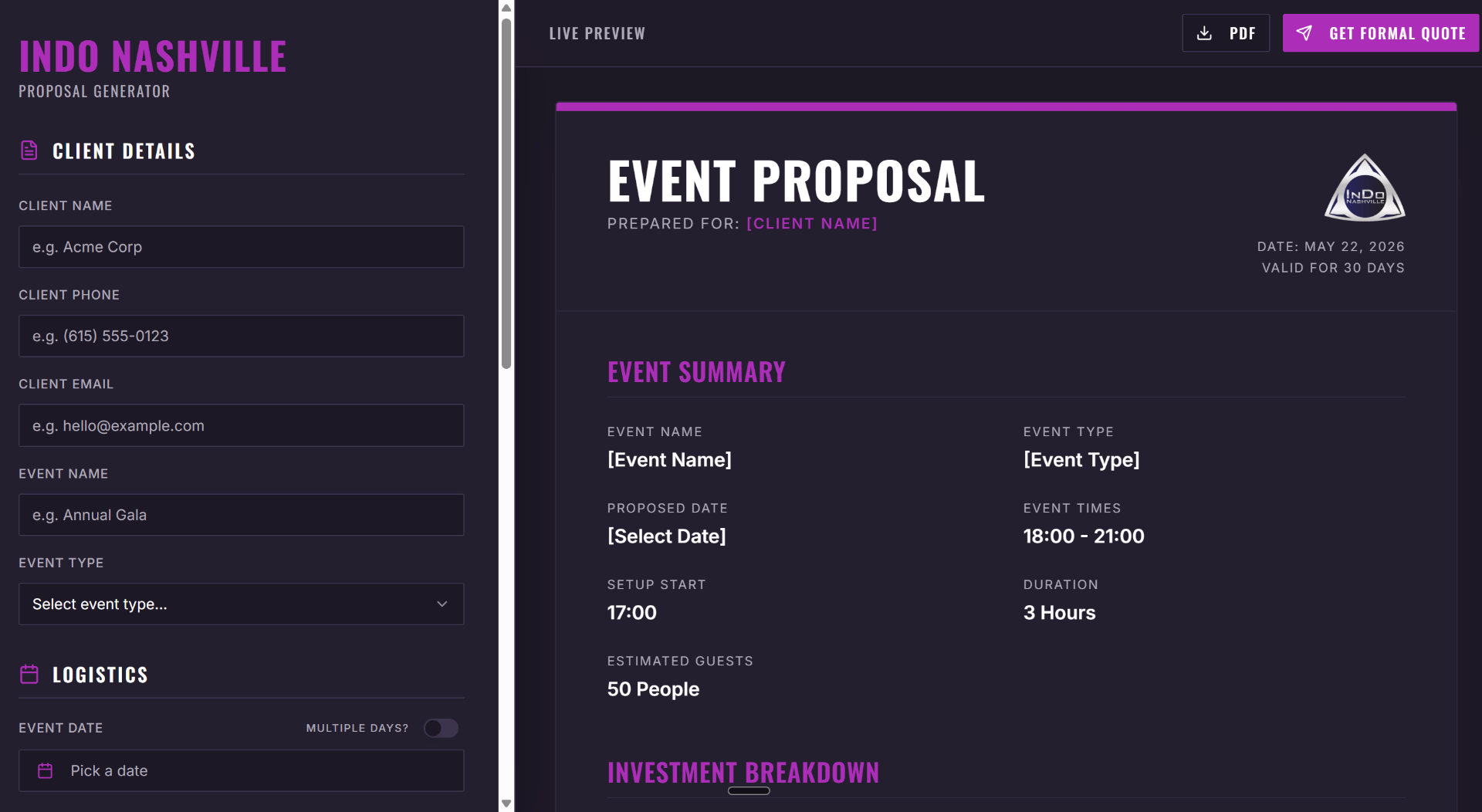
InDo Nashville is a hybrid coworking and event venue in Nashville's SoBro district. Their Live Venue Quote tool lets event planners and private clients check real calendar availability, build a custom event package, and receive an instant PDF quote with InDo's sales materials, all before a single conversation happens.
Live Example
Visit InDo Nashville's event site to see the tool in action, build a quote yourself to experience the full flow from your prospect's perspective.
Try the Live Demo →Based on the Live Venue Quote tool built for InDo Nashville, a hybrid coworking and event venue in Nashville, TN.
What's Included
Everything Built and Connected for Your Venue
Every Live Venue Quote tool is custom-configured for your space, your rooms, your pricing, your add-ons, your calendar, your brand.
Live Calendar Integration
Connected to your actual venue calendar so availability is always accurate. No manual updates. No stale pricing pages.
Custom Pricing Logic
Your rooms, rental durations, guest count tiers, and add-ons configured into the pricing engine. Every quote reflects your actual rates.
Branded PDF Quote Generation
Every completed quote generates a professionally formatted PDF in your venue's branding, sent automatically to the prospect.
Automated Sales Packet Delivery
Your venue's sales materials, photos, FAQ, policies, packages, delivered alongside the quote without anyone hitting send.
Internal Lead Notification
Your team receives an instant notification with the prospect's details, selected package, date, and quote the moment they complete the builder.
Mobile-Responsive Embed
Works on any device. Embeds cleanly on any venue website platform, no special tech requirements.
BrandWave Integration (Optional)
For BrandWave subscribers, the tool connects directly to your CRM pipeline so every completed quote creates a lead record and triggers your follow-up sequence automatically.
Works Standalone
Live Venue Quote does not require a BrandWave subscription. It connects to your existing website and calendar regardless of what booking or management system you currently use.
Deployment
Standalone or BrandWave-connected
Standalone
- • Can be used without a BrandWave subscription
- • Embeds on an existing venue website
- • Runs in Instant Quote or Guided Inquiry configuration based on the venue setup
BrandWave-connected
- • Inquiry information can connect to the BrandWave workflow
- • Follow-up processes can begin from the connected system
- • Date holds can optionally be used when configured for the venue's process
Who It's For
Built for Independent Event Venues of Every Type
Wedding Venues
Couples research and inquire on weekends and evenings. The Live Venue Quote tool captures them in the moment, before your office opens Monday morning and before they've toured somewhere else.
Corporate Event Venues
Corporate planners need fast, accurate pricing to get internal approvals. Give them a real quote they can share with their team immediately.
Private Event Spaces
Birthday parties, showers, rehearsal dinners, micro-events. High inquiry volume, often price-sensitive. Let the tool pre-qualify every inquiry before your team spends time on it.
Hybrid and Multi-Use Venues
Multiple rooms, multiple configurations, multiple pricing structures. The Live Venue Quote tool handles the complexity so your prospects never have to ask "what would this cost?"
If it has a calendar and a rate sheet, we can build the tool for it.
Pricing
Custom-Built for Your Venue
Every Live Venue Quote tool is custom-built for your venue configuration. Pricing is a one-time buildout fee plus a small monthly hosting and maintenance fee. Both are scoped during a brief discovery call based on your number of spaces, pricing tiers, add-ons, and calendar integration requirements.
Standalone
Live Venue Quote Only
For venues that want the client-facing quote tool without a full BrandWave subscription.
- Custom build
- Calendar integration
- Branded PDF setup
- Sales packet automation
- Internal notification
One-time buildout + low monthly fee, scoped on your call.
Get a Quote for Your VenueBrandWave Add-On
Live Venue Quote + BrandWave
For Standard Setup clients who want the quote tool integrated directly into their BrandWave pipeline, every completed quote creates a lead record and triggers the follow-up sequence automatically.
- Everything in Standalone
- Full CRM integration
- Pipeline connection
- Automated follow-up trigger
Available as an add-on to Standard Setup, ask on your demo call.
Ask About This on Your Demo CallLive Venue Quote is included in Premium Consulting at no additional cost.
Common Questions
What is Live Venue Quote?
Live Venue Quote is a client-facing availability, quote, and inquiry tool for event venue websites. Prospects can check availability and either build an immediate priced quote or complete a guided inquiry for formal quoting, while the venue receives structured event information for follow-up.
What is the difference between Instant Quote mode and Guided Inquiry mode?
Instant Quote mode lets prospects check availability, select a package, build their event with available options, and receive an immediate priced quote. Guided Inquiry mode lets prospects check availability, provide event details, explore relevant add-ons, and submit a structured inquiry for formal quoting by the venue.
Which Live Venue Quote mode is right for my venue?
If your venue is ready to show configured pricing publicly, Instant Quote mode fits your process. If you prefer to prepare and send the formal quote yourself, Guided Inquiry mode fits your process. Both use the same availability workflow and package builder.
Do I have to show my venue pricing publicly?
No. Guided Inquiry mode is designed for venues that prefer not to display pricing publicly. Prospects still check availability and share their event details, and the venue prepares the formal quote.
Can prospects check availability without receiving an instant price?
Yes. In Guided Inquiry mode, prospects check availability and complete a structured inquiry without seeing configured pricing.
Does checking availability reserve the date?
No. Availability checking does not automatically reserve or hold the date. It confirms whether the date appears open on the connected calendar.
Can Live Venue Quote place a date on hold?
For BrandWave-connected venues, the availability workflow can optionally be configured to place a hold when that fits the venue's sales process. Holds are not automatic and are only created when the venue configures them.
Which calendars work with Live Venue Quote?
Live Venue Quote supports availability workflows with Google Calendar and Outlook Calendar.
Does Live Venue Quote work with Google Calendar?
Yes. Google Calendar is supported for availability workflows.
Does Live Venue Quote work with Outlook Calendar?
Yes. Outlook Calendar is supported for availability workflows.
Can Live Venue Quote work without a BrandWave subscription?
Yes. Live Venue Quote can be used standalone and embedded on an existing venue website in either Instant Quote or Guided Inquiry configuration, without a BrandWave subscription.
What additional options are available when Live Venue Quote is connected to BrandWave?
For BrandWave-connected venues, inquiry information can flow into the BrandWave workflow so follow-up processes begin from the connected system, and date holds can optionally be used when configured for the venue's sales process.
What information does the venue receive after an Instant Quote?
The venue receives the prospect's event date, event details, the selected package and options, add-on interest, and the priced quote that the prospect built.
What information does the venue receive after a Guided Inquiry?
The venue receives the prospect's event date, event details, package or option interest, and add-on interest, submitted as a structured inquiry for formal quoting.
Stop Losing Prospects to Venues That Respond Faster
The first venue to respond wins the booking. Live Venue Quote makes sure that venue is yours, before your team has done a single thing manually.
Works with any venue website. BrandWave subscription not required.